Generate from recording
The  Generate from recording operation will send the sound map of your recorded audio to the server so that it can be applied to an AI voice. The AI will apply the intonations and vocal qualities detected within the voice recording to the AI generated voice reciting your dialogue.
For more information about AI voices, see Select Character Voices.
 How to process your audio using Regenerate New Recording
-
Select a Panel with dialog.
-
Do one of the following:
-
Click the
 Adjust Dialogue Intonation with AI icon on the Dialog section of the Panel view.
 -
Select the drop down menu at the end of the Dialog section of the Panel view > Select Adjust Dialogue Intonation with AI.
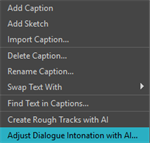
The Adjust Dialogue Intonation with AI dialog will open.
-
-
Record audio in the Adjust Dialogue Intonation with AI dialog.
For more information about recording audio, see Recording Audio.
-
Click the
Generate from recording button.Your recorded audio will be sent to the AI server for processing.
-
Do one of the following:
-
Click OK.
-
Click Apply.
-
Once you click OK or Apply, your augmented audio will be applied to the dialogue contained in the panel. You can hear how your voice recording is being applied to the AI voice by selecting the  Play AI generated audio button. The Adjust Dialogue Intonation with AI dialog will play the AI voice; however, the audio will contain the inflections, tone and emphasis that was input when you recorded your voice.
For more information about the Play AI generated audio, see Audio Playback.