Adjust Dialogue Intonation with AI Tools
When the Adjust Dialogue Intonation with AI dialog is launched, you will have access to a range of tools to augment the audio in your scene using AI. You will have the ability to record your own dialogue, send your audio to be processed by AI as well as adjust the timing of your panel and its dialogue.
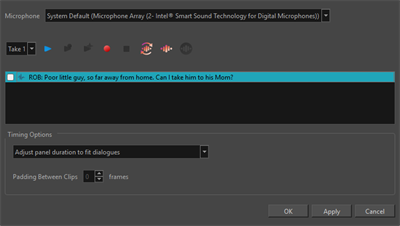
You can access the following tools in the Adjust Dialogue Intonation with AI dialog:
When you record new audio or send dialogue to the AI server for processing, an audio envelope will be generated in the Adjust Dialogue Intonation with AI dialog. The envelope will enable you to edit your audio directly in the Adjust Dialogue Intonation with AI dialog.

On the audio envelope, there will be four handles that you can manipulate. The white handles can be manipulated to apply an ease in or out in order to remove pops or harsh cuts from your audio.

The black handles are markers that will designate where on the audio mapping, the audio will begin and end. These handles can be used to cut out excessive ambient noise at the head and tail of the audio. However, these markers can create an abrupt start and stop to the audio.