Breakdown Assistant View
The Breakdown Assistant view acts as a main control center when applying breakdowns and in-betweens to your animation. From the Breakdown Assistant view, you can apply breakdowns and in-betweens based on a prescribed percentage value. You can also select from where to source the element that will be affected by the Breakdown Assistant.
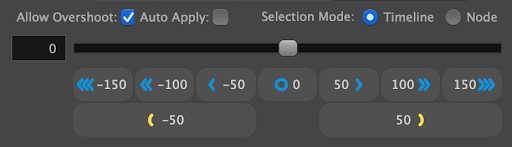
 Applying breakdowns and in-betweens using the Breakdown Assistant View
-
Select an empty cell in the Timeline view.
-
Open the Breakdown Assistant view by clicking on the Add View button and select Breakdown Assistant.
-
Select one of the following Selection Modes:
-
Timeline.
-
Nodes.
For more information, see Selection Modes.
-
-
Select a percentage value for your breakdown to favour using one of the following:
-
Percentage.
-
Nudge.
-
Slider.
-
For more information about the percentage values, see Applying Breakdowns.