Selection Modes
When applying the breakdowns to your animation using the Breakdown Assistant, you can specify where the animation layer is being sourced from. You can specify to apply breakdowns and in-betweens to an animation layer from the Timeline view, the Node view or when selecting from the Breakdown Assistant toolbar Auto.
Timeline
When creating a breakdown with the Timeline view selection mode selected, only the selected layer will be affected by the Breakdown Assistant view or toolbar.
Node
When creating a breakdown with the Node view selection mode selected, only selected nodes will be affected. The layer on the timeline that corresponds to the selected nodes will be affected when applying a key with the Breakdown Assistant.
Auto
The Auto selection mode is a shortcut that will apply breakdowns and in-betweens based on where the cursor is focusing.
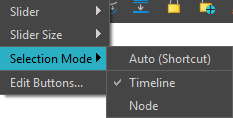
If the cursor is on the timeline, then the last layer selected will be affected by the Breakdown Assistant. Conversely, if the cursor is over the Node view, then the last node selected will have the breakdowns applied to it.
For more information about the Auto mode, see Breakdown Assistant Toolbar.