Generate from text
The  Generate from text operation will assign an AI voice to the dialogue in the Dialogue List that does not contain any audio. When the dialogue is sent to the server, it will be assigned an AI voice to recite the dialogue.
 How to Generate from text
-
Select a Panel with dialog.
-
Do one of the following:
-
Click the
 Adjust Dialogue Intonation with AI icon on the Dialog section of the Panel view.
 -
Select the drop down menu at the end of the Dialog section of the Panel view > Select Adjust Dialogue Intonation with AI.
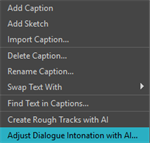
The Adjust Dialogue Intonation with AI dialog will open.
-
-
Select a line of dialogue from the Dialogue List.
-
Click the
Generate from text button.Your line of dialogue will be sent to the AI server for processing.
-
Do one of the following:
-
Click OK.
-
Click Apply.
-
For more information about selecting a new character voice, see Select Character Voices.