Harmony 25.1 Release Notes
Harmony 25.1, build 24630 (2025-12-02)
New Features
New Licensing Technology
A new licensing system and a new License Wizard is introduced in Harmony 25.1. The new License Wizard provides a simplified user interface and activation process, and supports new licensing technology that will allow managing licenses remotely.
A new version of licenses is required in order to manage them remotely. These version 2 licences will be rolled out progressively over the next few months to studios and individual users.
The License Wizard user interface has been updated to present a more modern and streamline experience.
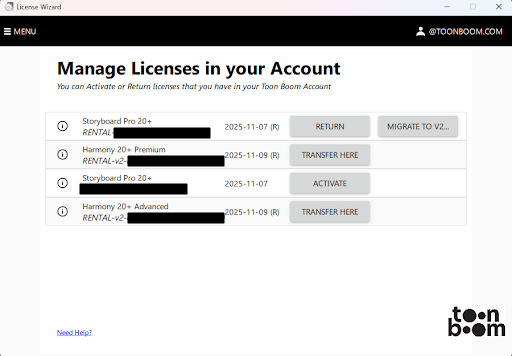
The Manage Licenses in your Account window is a centralized location where you can view all your Toon Boom product licenses at a glance. From this page you can view the product name, product key and expiry date of your license subscriptions.
Optimize Backup Files
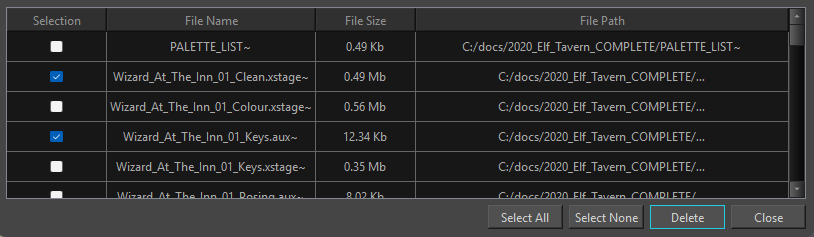
The Optimize Backup Files operation can be used to remove unused backup files from your scene folder. This lightens scenes and allows Harmony to source the necessary elements without needing to sort through unused data files.
The Optimize Backup Files dialog only lists files that are unused in your Harmony scene. The backup files that appear in the Optimize Backup Files dialog are listed by file name, file size and the file path.
Improvements
Ember Functionalities
Toon Boom Ember functionalities are now enabled by default in this release of Harmony.
A free Ember license, which is included with subscription licenses of Harmony, is required for these tools to work.
If you are not using a subscription license of Harmony, you can request a free Ember license add-on by sending an email to licensor@toonboom.com. Please include the email address linked to your Toon Boom account, as well as which product, Harmony or Storyboard Pro, you are requesting the add-on license for.
For more information, see Activating Ember.
Ember functionalities can be disabled by unchecking the “Enable Ember Functionalities” preference, located in the Advanced tab of the Preferences window.
General
-
Optimized the Drawing Substitution view’s thumbnail generation to improve performance and reduce latency.
-
New templates created in 25.1 no longer contain every palette in the palette list and only contain palettes used by the drawings in the template.
Scripting
-
node::moveToGroup now returns the new path of the moved node instead of the path of the group.
-
node::moveToGroup now has a boolean parameter to enable or disable auto-connection.
-
The following functions have been added to the scripting API to interact with scenes using the Compact File Structure.
scene::isCompacted
scene::uncompact
scene::buildVFSPath
scene::clearVFSCache
fileMapper::toVFSPath
fileMapper::VFSPathToString
Fixes
General
-
Add/remove exposure does not work when used on a frame with empty exposures and “Animate using Animation Tool” is not enabled. HAR-10952
-
View toolbars can be deactivated when a tab is dragged out of its panel if the remaining tabs do not have toolbars. HAR-9139
-
View specific toolbars only appear when the view is in a saved layout before Harmony is launched. HAR-9406
-
Incorrect premultiplication is causing antialiasing artifacts when loading PNG images in the Play application. HAR-1116
-
The Top and Side views occasionally fail to display elements with the correct drawing and/or zoom level, when FSAA is enabled. HAR-9524
-
The visual representation of a Timeline range selection disappears when the current frame is changed but the actual selection still remains. HAR-10690
Ember (AI)
-
Using the Clear mask operation on some Toon Boom bitmap drawings will cause the bounds for subsequent AI mask operations to be cropped. HAR-11211
Import / Export
-
Some Illustrator files take much longer to import in Harmony 24 and 25 than they did in previous versions. HAR-11256
Library
-
The Drawing Substitution view and Library view incorrectly display drawings in alphabetical order instead of the numerical order. HAR-11267
Linux
-
When inserting a template in a scene, the palette confirmation window causes Harmony to freeze. HAR-11086
Scripting
-
Using Action::perform with "owner" as the responder parameter causes Harmony to crash. HAR-11295
-
func::angleEaseIn and func::angleEaseOut return incorrect values. HAR-10832
-
Relative paths do not work in packages loaded from an environment variable path. HAR-10858
-
Using an invalid index with Timeline::setLayerEnabled and Timeline::layerEnabled can cause Harmony to crash. HAR-11126
-
The TB_RemoveUnusedColors script incorrectly removes colors that are still in use in the scene. HAR-10925
SWF
-
Non-inverted cutters become inverted in exported SWFs when the horizontal resolution is smaller than the vertical resolution. HAR-11376
-
The base scale of lines in exported SWF files with non-scalable line thickness enabled changes relative to the vertical resolution of the scene. HAR-11375
Xsheet
-
The XSheet Status Bar's frame number is one frame ahead of the actual frame. HAR-11283
-
The XSheet view's frame numbers no longer display scene marker colours. HAR-11226
-
Fill Selection", "Sequence Fill" and "Set 3D animation timing" only apply to the last selected frame if the Timeline view gains focus. HAR-11078
-
The "Hide Selected Column" shortcut (Alt-Shift-H) will trigger an undo command instead of the intended operation. HAR-11122
-
The "Go to Previous Drawing" shortcut (F) incorrectly jumps to the first exposed frame of the current drawing rather than the first frame of the previous drawing. HAR-11284