Activating Ember
Through Toon Boom Ember, you have access to a suite of AI-powered tools to enhance your workflow. By opting into Ember, you will be able to utilize the AI tools to automate time consuming and repetitive tasks and enhance visual quality of lower resolution images. Toon Boom has collaborated with AI providers to facilitate the integration of AI into your creative pipeline.
In order for Ember to be enabled, you will need a license for both Harmony 25 and Ember. With both licenses active, you will have access to the AI tools offered in the software.
If you are not using a subscription license, you will need to request a free Ember license add-on by sending an email to licensor@toonboom.com. Please include the email address linked to your Toon Boom account in the email.
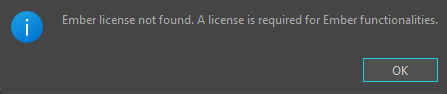
If you are working with the Harmony Database, additional steps are required to enable Ember.
For more information about enabling Ember in the Harmony Database, see Enabling Ember.
Preferences
By default the Ember functionalities are disabled and the AI tools are not active or visible in the interface. In order to access the AI tools and interface, you will need to activate Ember functionalities in the Preferences dialog.
 How to Enable Ember
-
Start Harmony and open or create a scene.
-
Select Edit > Preferences.
The Preferences dialog will appear.
-
Go to the Advanced tab and activate the Enable Ember Functionalities preference at the bottom of the dialog.

-
Close and relaunch Harmony 25.
Upon relaunch, Ember will be active and the AI tools will be visible and accessible on the interface.
AI Credits
The Show Ember Credits will display the amount of AI functionalities that have been consumed using Ember in your current project. You can refer to these credits to see how much you have consumed, as well as how many AI credits you have in total. You require an Ember credit balance in order to use Ember.
How to view AI Credits
-
At the top of the interface, select Help.
-
Select Show Ember Credits.