Storyboard Pro 27 Release Notes
Storyboard Pro 27, build 25334 (2026-06-16)
New Features
Panel Timer
Artists can now use the new Panel Timer view to record live, performance-based timing. By performing dialogues and actions in real-time, the captured timing can then be applied directly to panels within Storyboard Pro.
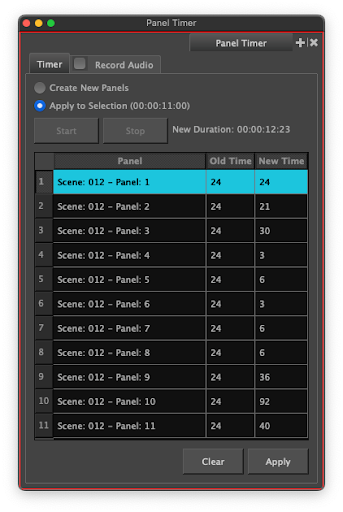
Two capture modes are available:
-
Create New Panels: This mode can be used to create panels based on the timing captured in the view.
-
Apply to Selection: The current selection of panels will be used to capture and apply timing.
Recorded timing can be reviewed and adjusted in a table before being applied.
Audio can optionally be recorded during the timing session then imported directly into the Timeline.
The Panel Timer also works with Thumbnailing Pages, allowing individual thumbnails to be timed independently.
Importing Clipping Masks from Photoshop Documents
Storyboard Pro's image import now preserves clipping masks when importing Photoshop Documents.
Clipped layers import as individually selectable and editable layers, not as flattened layers, while the layer order, naming, and group structure is fully preserved. This release supports:
-
Single masks with multi-layer clipped stacks
-
Clipping masks inside groups
-
Groups used as mask layers
-
Per-layer opacity
-
Blending modes on mask layers
Blending modes on clipped layers are not supported at the moment.
Importing Blending Modes from Photoshop Files
The Photoshop file importer now also preserves the blending modes applied to each layer and converts them to the equivalent blending mode in Storyboard Pro's Effect Stack view. Twenty-four Photoshop blending modes are supported: Normal, Darken, Multiply, Color Burn, Linear Burn, Lighten, Screen, Color Dodge, Linear Dodge (Add), Overlay, Soft Light, Hard Light, Vivid Light, Linear Light, Pin Light, Difference, Exclusion, Subtract, Divide, Hue, Saturation, Color and Luminosity. Imported blending modes remain fully editable and can be adjusted or disabled directly from the Effect Stack after import.
The following blending modes are unsupported and set to Normal upon import: Dissolve, Darker Color, Lighter Color and Hard Mix.
Mirror Content of the Reference View
The Reference View now supports horizontal image mirroring, the same way this mode can be used in the Camera and Stage views.
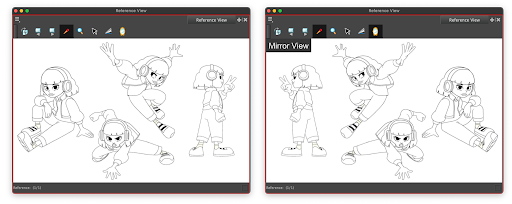
You can now flip reference drawings and character designs to the orientation required by the current scene without modifying the source artwork. The mirrored state is non-destructive and indicated by an overlay in the corner of the view.
Improvements
Export to Harmony
The Export to Harmony dialog now allows both the rendered animatic and the original scene artwork to be exported in a single operation. When both options are selected, Storyboard Pro generates a single Harmony scene containing the animatic, for timing reference, alongside the original vector artwork, eliminating the need for two separate export passes, and the manual assembly step previously required for combining them.
Audio Import through AAF
Custom audio clip names defined in Avid’s bin are now used when importing an AAF into Storyboard Pro.
Scripting
- setExportMoviesOnAdditionalTrack(bool) and setExportOnlyPanelsWithMotion(bool) have been added to exportToFCPXML and exportToAAF.
Fixes
General
-
"Save as default palette" command does not work. SB-6589
Drawing
-
Paste Layers Special duplicates layers instead of overwriting them when 'Overwrite existing layers with the same name' is enabled and that multiple layers are being copied. SB-6605
-
Clipping masks don't display properly when realistic preview is enabled. SB-6631
Effects Stack
-
Dragging an effect keyframe on a group causes Storyboard Pro to crash. SB-6638
-
Split Panel at Current Frame resets the enabled state of effects. SB-6621
-
Split Panel at Current Frame resets the blending mode of layers to "Normal". SB-6601
-
Pasting an effect onto a Group layer removes the group's content. SB-6603
3D
-
3D models with a custom field of view display at the wrong scale. SB-6634, SB-6623
-
3D layers in Bitmap Mode appear cropped when the project uses a non-default FOV. SB-6501
-
Changing a 3d model to Flattened Mode can sometimes cause a crash. SB-6617
-
Bitmap Mode uses an incorrect focal length when the 3D model is set to use the project camera settings. SB-6500
Import / Export
-
H.264 MP4 files fail to import on Windows. SB-6578
Library
-
Deleting a template from a network location in the Library view can sometimes cause a crash. HAR-11694
-
Sound imported into a library folder is always placed in the Audio Bin instead of the selected folder. SB-6598
-
Sounds copied from a Library folder cannot be pasted into the Audio Bin. SB-6559
-
Deleting an audio file from the Audio Bin does not warn the user if the file is still in use on the audio track when the timeline is hidden. SB-6541