Storyboard Pro 27.1 Release Notes
Storyboard Pro 27.1, build 25756 (2026-10-19)
New Features and Improvements
More flexibility and compatibility when exporting panels to Photoshop files
Exporting panels to Photoshop (PSD) files now offers improved compatibility and flexibility when using the different export commands. To maintain structure and visual appearance in external softwares, both Blending modes and Clipping Masks are preserved when Photoshop is selected as the output format.
You can also control whether Photoshop files are exported with or without layers.
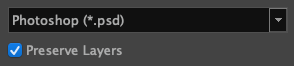
When enabled, the new option called Preserve Layers, will ensure all the layers in the panels are included when Photoshop (*.psd) is selected as the output format. This retains the previous versions’ behavior when exporting Photoshop files. When unchecked, layers will be flattened to a single Background layer in the resulting image.
This new option is available when Photoshop (*.psd) is selected as the output format in the Bitmap Export, Layout Export, and Export Project for conformation.
Play Audio while capturing timing using the Panel Timer
It is now possible to play the audio tracks from the Timeline while capturing the timing for your panels, allowing you to time actions to a soundtrack or a song. This new option can be turned on by clicking the speaker button in the Panel Timer view.
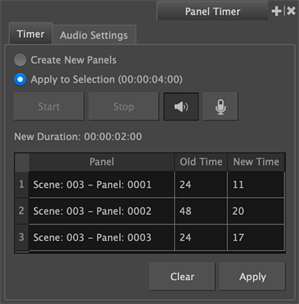
Additionally, the option to record audio during capture is now available as a button directly on the Timer tab of the Panel Timer, instead of being a checkbox.
Note that recording audio is not available when playing audio, and vice versa.
AAF: Exporting the Camera as a Filler
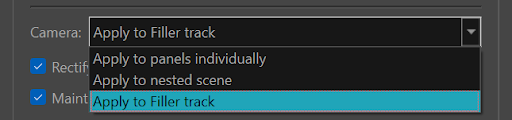
The new Camera: Apply to Filler options makes managing camera movements easier in Avid Media Composer by exporting them as filler clips, when exporting for conformation using the Export Project command.
When this option is selected, camera motions will be exported on filler clips on an additional video track within the AAF. This will allow you to modify the timing of individual panels in Avid while easily being able to adjust the camera movement.
The new option can be selected from the Camera dropdown menu, and replaces the Nest scenes containing camera motion option.
-
Apply to panels individually: Splits the camera motion across every individual clip within the scene.
-
Apply nested scene: Scenes in your animatic containing camera motion will be exported as a nest on which the camera animation will be applied.
-
Apply to filler track: Exports camera motion to a filler clip on a video track above the panel track. This new option is only available for AAF exports. It is not available when exporting to FCPXML.
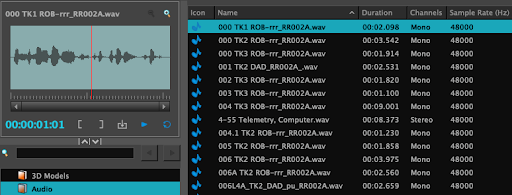
Detailed view in the Library’s audio bin
Locating audio files in your Audio bin is now easier. With the Audio Bin's updated detailed view, which introduces columns for Duration, Channels, Sample Rate, File Type, and File Name, that can be used for easy sorting.
Enhanced Security and IP protection
To protect your IP and help prevent plagiarism, new Security and Logging preferences have been introduced.
The new Security and Logging category includes the following options:
-
Prevent Screen Capture: Prevent Storyboard Pro’s interface and content from being captured or shared.
-
Print Watermark: This section provides options to apply and customize watermarked overlays when exporting images or videos.
-
Logging and Audit: This section contains preferences that can be enabled to track and log key actions, including file saving, exporting, and content editing.
General
-
The Remove Unused Files option in the Optimize Project dialog has been improved and now deletes all drawings that are not in use in the Project.
-
The license expiration warning that appears when there are 5 days or less left, can now be disabled by setting the TOONBOOM_IGNORE_LICENSE_WARNINGS environment variable to 1.
-
The Report an Issue form now opens in the system's default web browser instead of the built-in browser, allowing you to report issues without locking Storyboard Pro’s interface.
-
The USD library has been updated to version 25.08 to improve compatibility with the USD format.
Preferences
-
The default Antialiasing Mode preference has been changed from Performance to Quality. This restores line rendering to the quality level of earlier versions while enhancing the display of blurs and thin lines within the Camera and Stage views.
License Wizard
-
V2 licenses in the Local Licence Manager, which can be accessed using the Manage License Keys command, now display an Active or Inactive status in the "Expiration Date" column.
Fixes
General
-
The default palette is not copied to an extracted project when the first panel's top layer does not contain a drawing. SB-6681
-
Panel thumbnails no longer show content outside the camera frame. SB-6677
-
Reframe Static Camera does not work on grouped layers. SB-6668
-
When the "Playback Mode" preference is set to "Playback View", playback ends at the last frame of the audio track rather than the last frame of the scene. SB-6709
-
"Record Audio" with "Fill Next Available Frames" enabled, inserts the new clip after all existing clips instead of placing it in the next available gap. SB-6642
-
The application freezes on startup while attempting to load "Latest News" on networks where outbound connections are blocked by a firewall. HAR-11769
Layers
-
Using Paste Layer Special with a selection of non-adjacent layers, changes the layer order in the target panels. SB-6696
-
Using the "Copy Selected Layers" command causes a crash when multiple panels and layers are selected. SB-6685
-
Copying a panel with a clipping mask from the storyboard track to a video track causes incorrect layer ordering behaviours in the pasted panel. SB-6633
-
Replacing a layer by dragging it onto a panel in the Thumbnail view removes the clipping mask from the layer. SB-6619
-
Applying a Clipping Mask to a selection that includes layers both inside and outside an existing clipping mask produces unexpected results. SB-6538
Import / Export
-
PSD files exported with a transparent background have a fully opaque alpha channel. SB-6691
-
Some unsupported PSD blend modes are discarded on import instead of being set to Normal in the Effect Stack. SB-6653
-
Exporting a PDF using the "Vertical Japanese Format" profile reverses the expected order of the scene and panel durations. SB-6445
Conformation
-
PNGs exported via XML and AAF conformation include an alpha channel even when "Render panels using transparent background" is unchecked. SB-6570
Library
-
Changing only the capitalization of a template name results in the template being deleted. HAR-12097
-
Templates of audio clips with animated effects cannot be brought back into a project. SB-6602
-
Refreshing the Audio Bin does not show files that were manually copied into the project's audio folder. SB-6512
-
Pasting an audio file between Library sub-folders does not show the pasted file until the folder is manually refreshed. SB-6629
-
The Library view does not refresh after templates are pasted into it. HAR-11713
-
Undoing and then redoing a template import causes some drawings to go missing. HAR-11782
-
Using "Generate Thumbnails" on a Library folder collapses it and removes the expand icon. SB-6628
Effects and Effect Stack
-
The Reset command does not work on individual parameters in the Effect Stack View. SB-6742
-
The Directional Blur effect does not follow the camera rotation in the Stage and Camera views. SB-6632
Preferences
-
Importing a preferences file fails with a facility-wide lock error when the Storyboard Pro’s language is set to Japanese. SB-6708
License Wizard
-
A "Product code not found" error is returned when borrowing a license from a floating license server. HAR-11722
-
License Wizard will not launch on systems that do not have an accelerated video card. HAR-11635