Select Character Voices Dialog
The Select Character Voices operation will apply an AI voice to the characters in your script to recite dialogue. The Select Character Voices operation will compile a list of the characters in your script from the Panel view. Once compiled, you can apply an AI voice to each character from the list of Predefined Voices in the Select Character Voices dialog.
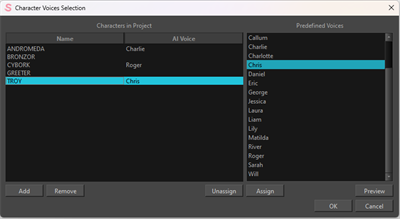
| Property | Description |
|---|---|
| Characters | |
| Name | A list containing all the characters in your scene. |
| AI Voice | A list of the AI voices that have been assigned to a designated character. |
| AI Voices | |
| Predefined Voices | A list of all AI Voices available to choose from. |
| Add |
The command to add a new character name to the Name list. NOTE A textbox will appear where you can input the name of a character that is either missing or that you want to add to the Characters’ Name list.
|
| Remove | Remove any character names from the Name list. |
| Preview | Sample a selected AI voice. |
| Assign | Assign a selected AI voice to a character in the Name list. |
| Unassign | Unassign a selected AI voice from a character in the Name list. |
| OK | Confirm AI voice assignments. |
| Cancel | Reject all AI voice assignments. |