Producer 26
26.0.0 (build 3072, Feb 05, 2026)
In a nutshell
Producer 26 addresses some usability, performance issues, and bugs.
Harmony Integration
Features
-
Send scenes to Harmony Render from the Producer Web interface
In the Production page, under “more”, it is now possible to send (checked) scenes to Harmony Render. A dialog will open, offering rendering options. You can check the status of the render using the Render queue manager from the Harmony Control center. This will render using the scene’s regular write module, not the WebCC render.
-
Harmony Scripts: Batch Render in Offline Mode.
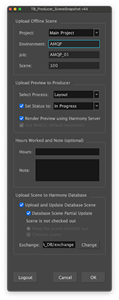
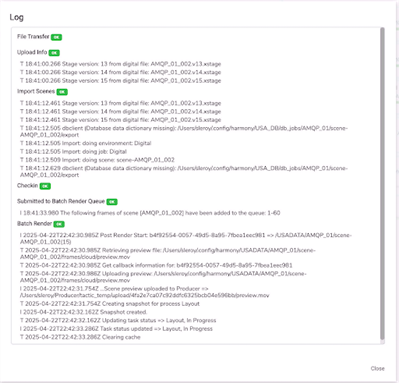
When working offline, users may now send the rendering of their scene preview to Harmony Server. The scene will be uploaded to Harmony (as before), checked in if specified, and then sent to the render queue (which needs to be running and configured for the specified environment). Once rendered successfully, the preview will be uploaded to Producer, and the status, notes and work hours updated as requested.
Progress will be updated in the notification feed:

-
Harmony Scripts: Retrieve Producer scene information even if Producer scene name differs from Harmony’s.
-
Offline Scenes (Harmony Scripts): Set Partial Upload as default
-
Asset Snapshot Script:
-
Assets: Add “private” option to skip template generation altogether
-
Reconcile Linux path and Windows path for template path when working with Harmony Database. This feature may be necessary where Harmony Database is installed on an Operating system different from the users.
-
It is enabled by adding a new /USA_DB/client-workspaces.json containing the paths to be used by the Harmony users for each applicable platform (Windows, Mac, Linux)
{
"_default": {
"assetLibrary": "/USA_DB/library/assets"
},
"user.windows": {
"Characters": "C:/assetLibrary/Characters"
},
"user.mac": {
"Characters": "/Users/Shared/assetLibrary/Characters"
},
"user.linux": {
"Characters": "/mnt/assetLibrary/Characters"
}
}
-
Bug Fixes
-
Harmony Synchronisation: Address synchronisation issues and provide per scene synchronisation status.
-
Harmony Scripts:
-
BatchRender Snapshot script is now auto-updated in database mode
-
Offline scenes exported from Harmony 21.1 can now be uploaded to Harmony using the TB Producer SceneSnapshot script.
-
Do not update “legacy” snapshots script if Harmony >= 21.1
-
The Hashtag character is now supported in passwords
-
Notes are now submitted when using render queue to generate preview
-
Producer Link
Bug Fixes
-
The message “Window has been destroyed” does no longer appear.
-
"No export matches current Harmony Database scene" message will only appear when relevant
-
Check Token Expiry upon opening Producer Link (this will not fix all expiry issues if Producer Link remains opened too long)
-
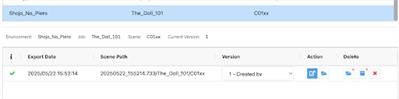
Downloaded Offline Scene are no longer erroneously marked as outdated
-
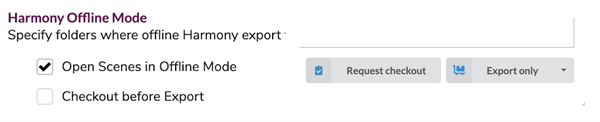
Offline Scenes: Now honouring the "Checkout before Export" option when downloading from Producer web
-
Offline Scenes: Now opening scene with default version of Harmony when wrong Harmony Alias is specified
-
Asset CSV: When using Producer Link to update information about assets, the External Ref column is no longer mandatory
Miscellaneous
Search and Filtering
Features
-
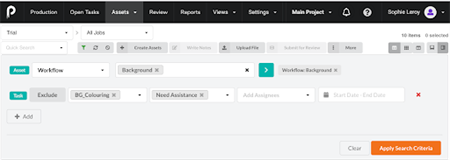
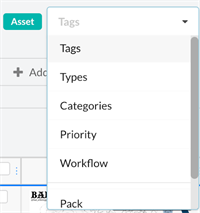
Workflow and priority filters are now available for assets and scenes. Here is the list of all available filters:
-
Assets: Tags, Type, Category, Priority, Workflow, Custom Fields + task level filters
-
Scenes: Workflow, Priority, Custom Fields + task level filters
Filtering by workflow may improve performance by narrowing down the search when searching by tasks.
-
-
Custom fields searches now support special characters
Bugfixes
-
More accurate results when searching by status start/end date
Performance Improvements
-
Performance Improvements
-
Improved performance when searching by Task status date
-
Assembly: Eliminated snapshots over fetching
-
Improved querying tags when retrieving assets
-
Open Tasks: Optimized fetching of assets
-
API: Optimized GET /tasks/me
-
Prevented duplicate search_codes in tag_to_sobjects (added unique constraint in database)
-
Production: Job completions are displayed faster
-
Assets: Better performance when searching by associated Environment
-
Assets: Prevented double fetching of assets when consecutive searches are performed. If a previous search has not completed when hitting the “Apply Search” or performing a quick search, the previous search will be cancelled before issuing the new one.
-
Open tasks: Reduced the number of queries to retrieve workflows (get /pipelines)
-
Improved querying of operations for live websocket updates
-
Other Features
-
It is now possible to import a PDF image as a Preview
-
Removed "Harmony Scene export successful" Toast. This toast tended to appear before the scene had actually been exported and retrieved on the user’s computer.
-
Notes are now updated live in Production, Assets, Open Tasks (This feature is not available in the Review Tool)
-
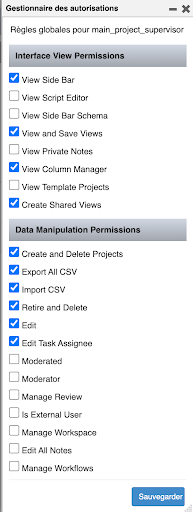
The permission to Edit Task Assignee has been added
-
This permission will be active by default to Admin/Supervisor/Standard groups to remain backward compatible with previous versions. It can be disabled as needed from Settings > Security > Groups > Global Rules
-
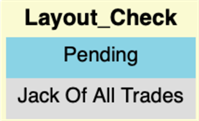
Users who don’t have the permission to change assignee will only be able to see the current assignee:
-
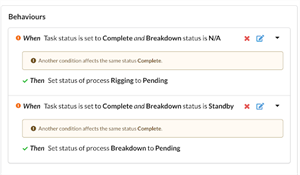
Workflow Editor (Behaviours): Added “and” logic. This allows for more complex workflow logic where we can check for the status of a process and the status of another before activating a consequence
-
Added the ability to change the author of a note through the API
-
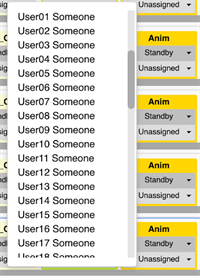
Tracking Pages: Task statuses and assignees selector are now scrollable
-
Review Tool: Improved display of long process lists.
-
Tracking Pages (Production, Assets, Open Tasks): Fixed the display and editing of data in the side panel and Focus View.
-
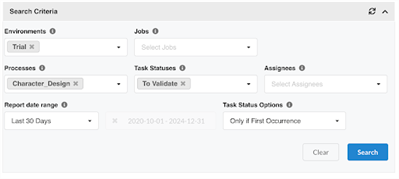
Productivity Report: Add “Only first occurrence” option
-
With this option, only when the task status has been set for the first time in the searched period will it be reported.
Other Bug Fixes
-
Fix Review synchronization issues
Some recently uploaded Harmony scene preview movies have been found to have a discrepancy between the audio and video tracks (where audio is longer than the video by a frame), causing a desynchronization in some reviews’ stitched movies. These were caused by a bug in Harmony <24.0.2 that was fixed in Harmony 24.0.2.
In Producer, added some failsafes to cut the review movie (audio + video) to the length of the video, as well as ensuring that empty audio gets handled properly as well.
-
The Audio no longer goes out of sync in stitched review.
-
Review: The files individual md5s are now used to determine if a stitching needs to be recomputed.
-
Missing, corrupted or otherwise invalid snapshot files are now regenerated.
-
-
Fixed issue with preview movies not playing when using full screen in the browser
-
Tracking Pages: Missing or corrupted files can now be identified and deleted
-
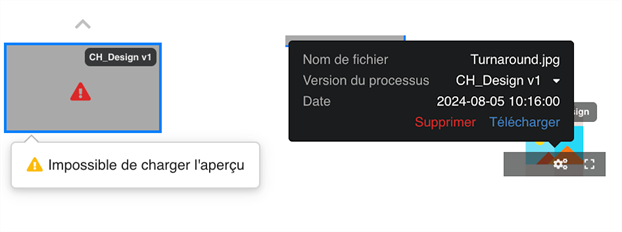
Missing previews will now be identifiable in the Focus View.
-
They may then be deleted by selecting the faulty entry in the carousel and deleting it from the contextual popup.
-
-
Review Tool: Snapshots causing errors are now identified

-
Review Tool: The names of processes are no longer translated (it was causing a crash)
-
Assets: Existing types and categories can now be used when importing CSV
-
Workflow Editor (Behaviours): Updating a behaviour condition no longer creates a new behaviour.
-
API: Behaviours: We no longer return an error 401 if user does not have the right permissions (Behaviours)
-
"Retired" asset can now be re-activated
-
Regular users can now manage "Views"
-
When loading Production page for Jobs, Custom Fields content is no longer missing
-
External Refs are now displayed properly in the side panel