Harmony 27 Release Notes
Harmony 27, build 25334 (2026-06-16)
New Features
Attribute Controller
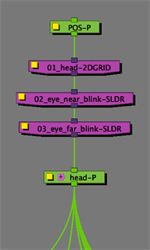
The Attribute Controller is a specialized tool that has been designed to replace some of the Master Controller functionality. Like a Master Controller it can be used to pose and control your rigs. However, unlike a Master Controller, it works by adding custom offsets to the attributes used in your rig. This allows it to modify the rig in a non-destructive way and for multiple Attribute Controllers to seamlessly affect the same target attributes. The Attribute Controller nodes can be applied directly to a rig in the Node view or on the Timeline.
The Attribute Controller consists of four different types of interpolator nodes:
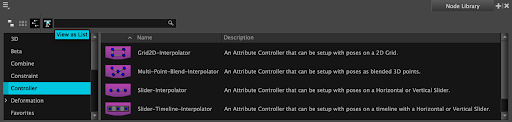
When these controllers are attached to your rig, you can create custom poses at different positions on the controller, and interpolate between these pose positions when animating.
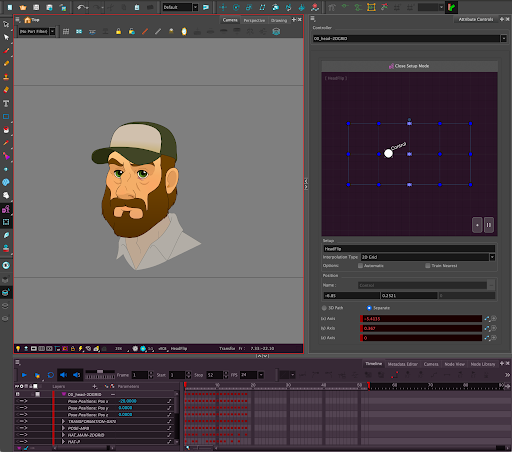
The Setup Mode is a state where you can train an Attribute Controller directly by adding and/or modifying pose positions. It can be activated and deactivated from the Attribute Controls view or the controller's Layer Properties. While in Setup Mode, the name of the Attribute Controller will appear in the status bar, at the bottom of the Camera view, the interface will turn purple and the animation mode will automatically change to Attribute Controller Setup  .
.
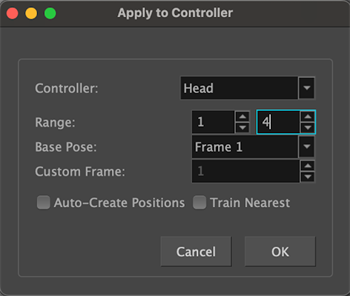
Attribute Controllers can also be trained from existing keyframes in the timeline by using the Apply to Controller dialog. This dialog can be launched by either right-clicking a layer in the Timeline, right-clicking a node in the Node View or from the Rigging menu at the top. The keyframes will be ingested into the controller and applied to the pose position of the corresponding frames. This allows for the initial posing to be done on the standard timeline, and then applied to an Attribute Controller afterwards. This process can also be used to convert an unrolled Master Controller into an Attribute Controller.
Once a controller has been trained, it can be positioned from the Attribute Controls view or the controller's Layer Properties. An Attribute Controller can also be connected to an OGL Controller, allowing it to be manipulated directly from the Camera view.
Selection Lock Node
The Selection Lock node prevents other nodes that are connected above it from being selected in the Camera view.
Selection passes through to the next selectable element beneath the locked content. Locked elements remain fully visible and renderable. They also remain fully editable in the Timeline view.
This is useful for complex rigs with cut-in textures or gradients. The texture or gradient can be locked with the Selection Lock node allowing for easy selection and manipulation of the underlying elements.
Horizontal Flip in the Reference View
The content of the Reference View can now be flipped horizontally using the Mirror View mode, the same way this mode can be used in the Camera and Drawing views.
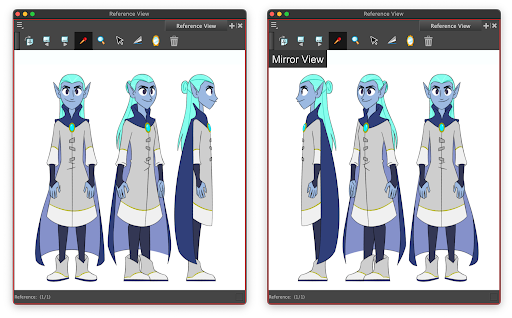
Mirroring the content of the reference view allows you to view your reference drawings and designs from the desired perspective. For example, it allows you to flip a character’s design from a left profile view to a right profile, to match the need of your scene.
Improvements
Generate Auto-Matte
The settings last used in the Generate Auto-Matte dialog are now remembered between sessions, allowing you to quickly use the command without having to set the options on every instance. Also note that the list of art layers in the dialog are no longer displayed in reverse order.
Scripting
You can now specify the colour space to use when exporting ProRes files via scripting. HAR-11617
Fixes
General
-
Undoing and redoing multiple template imports can sometimes cause a crash when the templates contain Master Controllers. HAR-11670
-
Harmony is blocked from launching on Windows 11 with Smart App Control enabled due to unsigned DLLs. HAR-11692
Drawing
-
Using the textured eraser on one art layer removes the texture from other art layers. HAR-11705
-
The "Allow snapping on all drawing layers" and "Apply to all Visible drawing layers" options stop working when drawings are connected to a Pass Through composite. HAR-11695
Effects/Comp
-
The Particle effects render inconsistently across operating systems due to differences in the random number generator. HAR-11809
-
In the Blur-Radial-Zoom node's layer properties, the preset buttons don't actually apply values to the attribute. HAR-11751
-
The camera view preview of the Lens Flare node does not accurately reflect its position and size in the soft render. HAR-11546
-
The Surface Map Height Matte port works correctly in 16-bit rendering but is ignored in 32-bit rendering. HAR-9274 (PRM only)
3D
-
Empty legacy animation layers cause a crash when baked or converted to a Subnode Override. HAR-11660
-
The Bake to Subnode Override command creates constant keyframes if Stop Motion Keyframe Mode is enabled and does not respect the source keyframes. HAR-11651
-
3D animation exposed in the Xsheet is not included when using the "Bake to Subnode Override" command. HAR-11621
-
ATOM/USD export ignores the camera's Override Scene FOV setting and always uses the scene FOV instead. HAR-11606
Compact File Structure
-
16-bit textures are not supported when using the compact file structure. HAR-11675
Import / Export
-
Importing an EXR texture with a depth buffer downgrades the image from float to 16-bit. HAR-11676
-
Selecting "Single Layer" in the Multilayer Image Import Settings dialog sets the transparency to "Premultiply with White" HAR-11648
-
16-bit grayscale images do not display in the OpenGL view after import. HAR-11645
-
Timing columns using EXR images render as black when the transparency type is not set to Premultiplied With Black. HAR-11644
-
Importing a 32 bits-per-channel PSD produces a corrupted image. HAR-11643
-
Importing a 16-bit grayscale PSD with transparency as individual layers causes a crash. HAR-11642
-
Importing a 16-bit grayscale PSD with transparency as a single layer produces a red and green opaque image instead. HAR-11639
-
16-bit grayscale PSDs do not render unless the transparency type is set to Premultiplied With Black. HAR-11638
-
PSDs saved without the Maximize Compatibility option fail to import and leave a phantom entry in the undo history. HAR-11633
-
Attempting to import a nonexistent PSD silently fails without any user feedback. HAR-10756
Library
-
Opening the Optimize Palette dialog after creating a template in the Library and canceling the rename dialog causes a crash in MacOS. HAR-11785
-
Deleting a template from a network location in the Library view can sometimes cause a crash. HAR-11694
Nodes
-
Enabling thumbnail preview causes the Node view to become sluggish when the working colour space is set to something other than sRGB. HAR-11712
-
When dragging to adjust a layer attribute, the value flickers if the mouse is moved diagonally. HAR-11663
-
Locking a layer from its layer properties takes longer than expected. HAR-11636
OpenGL
-
Elements disappear from the camera view when an effect node is placed between a Pass Through composite and a Colour-Override. HAR-11671
-
The Directional Blur is affected by rotation and skew transformations in the OpenGL view which is inconsistent with the soft render. HAR-11649
-
Equivalent Colour Overrides are not being cached correctly. HAR-11545
Rendering
-
Soft-rendering crashes when a bitmap image is connected to an Apply-Image-Transformation node. HAR-11773
-
Exporting a movie using Render Write Nodes can result in one or more extra frames. HAR-11738
-
The Surface Carving and Adding tools do not behave correctly during soft rendering. HAR-11576
-
Pencil lines are not soft-rendered when a drawing has “Preserve Line Thickness” enabled and it is connected to a bone deformer. HAR-11228
Scripting
-
The Animate using Animation tools preference is not respected by the TB_sceneCreated_japan.js script. HAR-11706
Timeline
-
Copying and pasting keyframes from a collapsed group in the timeline does not work in some cases. HAR-11210