Harmony 25.2 Release Notes
Harmony 25.2, build 24991 (2026-03-25)
New Features
Art Layer Manager
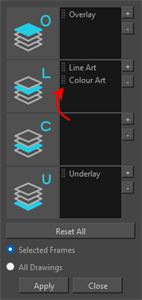
The Art Layer Manager is a new tool designed to simplify the management of art layers. It allows users to move, swap, duplicate, consolidate, and delete artwork from art layers by simply dragging them to the desired position. After arranging the art layers, the modifications can be applied to a single selected frame, a range of frames, or all drawings within the selected element nodes. This tool is accessible via the Drawing menu and can also be added into any customizable toolbar.
AI Generative Fill
The new AI Generative Fill operation can be used to generate visual content using written prompts.
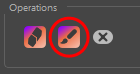
Once the desired area has been selected using the AI Mask Brush, click the new AI Generative Fill button. This action opens a window where you can enter a text prompt to generate content that will replace the masked region.
Audio Folder in the Library
The Library view now has an Audio folder that shows the audio files that are used in the scene. To organize your file, you can create folders or change the display name of the audio files. Creating folders and renaming audio files in the Library view does not have any effect on the file on disk.
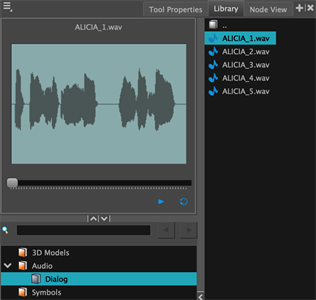
Audio files can be dragged from the Audio folder to your Timeline to insert them in the scene. Doing so automatically creates a sound layer in the timeline and inserts the audio file.
When an audio file is selected, a preview of the audio file appears in the left panel of the Library view. From the preview window, you can play, scrub, view the length of your audio file and visualise its waveform.
OpenGL Timeout
Interactive OpenGL renders will now stop if the render time exceeds the time value (in milliseconds) defined in the preferences. This is intended to help prevent heavy scenes from freezing Harmony’s interface for long periods. To adjust these limits, two render timeout preferences have been added to Harmony's OpenGL tab of the preferences.
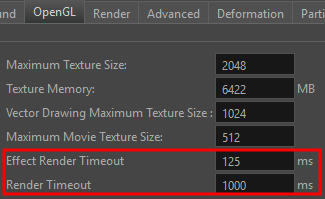
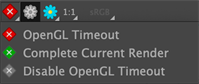
When the Effect Render Timeout time is exceeded for a given frame, a yellow icon will appear in the status bar at the bottom of the Camera view, indicating that not all effects were rendered. If the overall Render Timeout time is exceeded, a red icon will appear instead, indicating that the image that appears in the view is incomplete.
Pressing the icon in the status bar opens a menu with the following options:
-
OpenGL Timeout: Enables the timeout
-
Complete Current Render: Ignores the configured timeout limits for the current render, allowing it to finish. Timeout values will be respected for subsequent renders.
-
Disable OpenGL Timeout: This option ensures that the OpenGL renders always complete, regardless of the time required, by ignoring predefined OpenGL timeout values.
Ember (AI Features)
-
An optional text prompt is now available when using the Expand Image AI Operation. HAR-11571
-
AI image operations can now process multiple images simultaneously, reducing the time required when generating content. HAR-11505
General
-
A warning is now displayed if OpenGL fails to initialize when opening a scene. HAR-11557
-
The bundled version of 7-zip has been updated to address potential security vulnerabilities. HAR-11521
-
The Optimize Palette and Optimize Drawings commands now verifies if the assets are used in all the versions of the opened scene. This can be turned off by unchecking the "Check Other Versions" option in their respective window. HAR-11223
Scripting
-
New functions were added to copy, move and clear art layers in drawings. HAR-11582
DrawingTools::copyArtLayer
DrawingTools::moveArtLayer
DrawingTools::clearArtLayer
Fixes
General
-
Harmony crashes on Windows when starting or when using the file browser due to conflicts with MSVCP and GROOVEEX.DLL HAR-11570
-
No error message is displayed when a node is renamed to a name that already exists. HAR-11367
-
Attributes set to "2D Path" show blank values in the Timeline view. HAR-11353
-
The colour list background incorrectly displays as black instead of white when loading a scene from the command line using the white stylesheet. HAR-11329
-
Pressing Enter on the Save Script dialog on macOS incorrectly cancels the operation without saving the script. HAR-11288
-
The Xsheet "Move to Previous Drawing" shortcut jumps to the first frame of the current exposure instead of the previous drawing. HAR-11284
-
Cancelling the removal of an OpenGL Preview Settings preset in the Preferences incorrectly removes the preset. HAR-11558
Deformers
-
Semi-transparent drawings with deformations show visible overlaps and dark spots in renders. HAR-11333
Drawing
-
The "Strokes to Pencil Lines" menu command is incorrectly disabled when working in the Camera view. HAR-11431
-
Harmony crashes when a selection is deleted while using the perspective tool override keyboard shortcut. HAR-11443
-
Pencil lines that have been repainted at an angle sometimes change after other drawing tools are used. HAR-11224
-
The shape and angle of pencil line tips change inconsistently based on the current zoom level. HAR-11188
Effects/Comp
-
Colour Override nodes don’t have any effect on 16-bit or floating-point textures when using "New RGB Only" or "New Alpha Only". HAR-11561
Ember
-
Original and AI-expanded images in the "Expand Image" dialog appear at inconsistent scales and alignments. HAR-11590
-
Images generated using the "Expand Image" are incorrectly offset by 4 pixels on both axes. HAR-11555
-
Redundant image uploads during repeated AI operations increase processing time unnecessarily. HAR-11502
Import / Export
-
On Windows, importing H.264/YUV video files results in greyed-out colours as the full RGB range is incorrectly mapped. HAR-11602
-
Movies exported using the OpenH264 codec exhibit a noticeable colour shift compared to the original scene colours. HAR-8392
Linux
-
Checkboxes in the Optimize Palettes and Optimize Drawings dialogs are not visible HAR-11322
OpenGL
-
When Render Blurs is enabled in the OpenGL preferences, switching between display nodes can cause corrupted results in the Camera view that has a blue tint. HAR-11516
-
An empty Colour Override node causes incorrect rendering of textures in the OpenGL preview. HAR-11364
-
Blending modes with legacy blending nodes render with incorrect results. HAR-11515
Rendering
-
Grayscale PSD files without an alpha channel fail to render correctly. HAR-11452
-
Semi-transparent pencil lines with sharp curves show overlapping triangles in renders. HAR-11319
Python
-
OMH::HarmonyProject::import_handler fails to apply alignment settings. HAR-11592
Scripting
-
Commands using the Process2 class fail when the provided file paths contain spaces. HAR-11600
-
The DrawingTools::createLayers fails to correctly apply all thickness path parameters. HAR-11563
SWF
-
Pencil lines with beveled end caps export at an incorrect thickness to SWF files when attached to a deformer. HAR-11410