AI Increase Texture Resolution
The AI Increase Texture Resolution operation will enhance the resolution of brush and pencil textures. By increasing the resolution, the AI will add pixels to your brush and pencil textures making them appear smoother by softening harsh edges. The AI Increase Texture Resolution dialog will give you the option to scale your texture resolution up by a scale factor of 2 or 4.
The AI Increase Texture Resolution will work with both Harmony default textures as well as any textures that are imported. If you import an image as a brush or pencil texture, the AI Increase Texture Resolution will scale up the resolution like the Increase Image Texture Resolution operation.
For more information about importing textures, see Adding Textures.
 How to Use AI Increase Texture Resolution
-
Create a stroke with your texture brush or pencil.

-
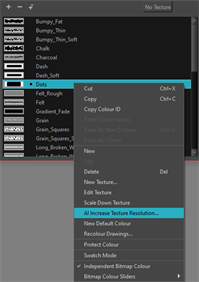
Right-Click texture in palette list.
-
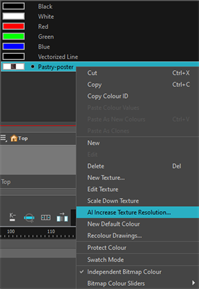
Click AI Increase Texture Resolution.

The AI Increase Texture Resolution dialog will open.
-
Select the increase multiplier x2 or x4.

-
Click Ok.
A progress bar will appear.

When you click OK, your brush or pencil stroke will be processed with AI and generate your texture with the higher resolution applied.
When you apply the AI Increase Texture Resolution to your brush or pencil texture, Harmony will remember the increased resolution for the active session. If you close and reopen the session, the texture in the palette list will not be at the same resolution as the processed brush or pencil texture in the Camera view. For this reason, and to keep uniformity, it is recommended to apply the AI Increase Texture Resolution as the last step.
In the AI Increase Texture Resolution dialog, the resolution of your current texture and the resolution of your processed texture will be displayed.

You can increase the resolution on your brush or pencil texture more than once. However, there is a limit. The AI Increase Texture Resolution operation will only increase the resolution of your brush or pencil texture up to the limit of 8,192 x 8,192 pixels.