AI Mask Selector Tool Properties
The  AI Mask Selector is a tool you can use to select AI generated masks on your imported images. This tool will allow the user to select shapes and objects detected by the AI once an AI Mask has been generated. To generate an AI Mask, you will need to use the
  Generate AI Masks operation. This allows you to pick out specific elements, provided an AI Mask is generated for that element.
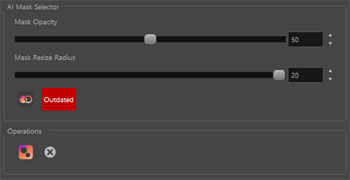
| Property | Description |
|---|---|
| Mask Opacity | The level of transparency of the AI Masks. |
| Mask Resize Radius |
The amount of padding applied around the generated AI Mask. TIP It is encouraged to apply padding to exceed the boundary of the selected element to avoid artifacts when employing the AI Erase and Replace operation.
|
|
Generate AI Masks |
Generate a set of AI Masks for your current layer. |
| Activity Status |
An indicator to show if an AI Mask is applied to the current image. Up to Date: The current image has an AI Mask applied.
Outdated: The current image does not have an AI Mask applied or another image has an AI Mask applied.
|

