The window exports to multiple resolutions, generating multiple sprites sheets depending how many sprite resolutions you defined.
This saves different animations of the same character into the same name. For example, if there's an idle, run, and jump animation, these should all share the same Asset Name. You can think of it as the overall collection of animations. Inside are the different saved scene versions whose drawings you can reuse for all the animations in that character set. Each scene version will be displayed as an item in the list.
When you export an animation, only the drawings used in that scene are exported. All the drawings are exported individually first and then atlased together into a sprite sheet.
If you saved multiple animations to the same Asset Name (i.e. SpaceDuck: run, idle), then it will re-atlas the sprite sheet to include all the drawings from all the animations in that folder, creating a new animation file, but reusing the same skeleton.
 How to export sprite sheets
- Add the Game toolbar, by selectings Windows > Toolbars > Game.
- Run the script by clicking the
 button in the Game toolbar.
The
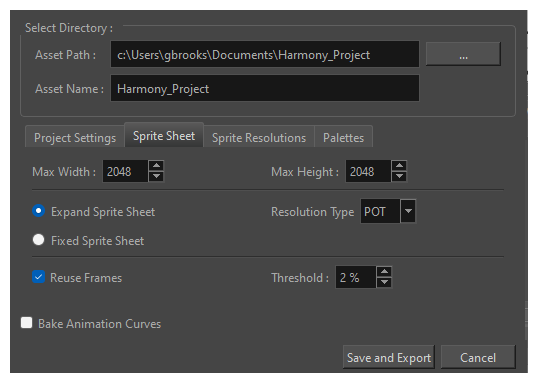
- Set the Save Path to the correct folder in your Unity project if you want it to update automatically. If not, you can save anywhere, then transfer the animation into your Unity project, or any other game engine you want to use.
- Set your sprite sheet preferences.
- Click Export.