About Exporting Jump Data for Gaming
There are two main pipelines for exporting data from Jump to your game engine:

Creating Animation in Jump
When creating character rigs and animation for games, there are a few things to think about before starting. Artists and programmers should work together to make sure their needs are met.
- What platforms will your game be created for? Windows, Mac, Mobile, iOS, PS, XBOX, etc.
- What animation style will be used to create the look of the game? Hand drawn, cut-out, with textures, etc.
These are just a few of the questions to consider before getting started. They all have an impact on how you design, build, and animate characters.
For example, if you’re planning a mobile game for smartphones, then you will most likely want to keep your game under 50 MB, so it can be downloaded without having to be on Wi-Fi. In that case, your most important consideration is to create efficient characters with very tight sprite sheets and reuse a lot of the animation to keep the file sizes small.
If you’re making a game for consoles like the PS or Xbox, then you have the freedom to create larger textures. You may want to animate frame-by-frame, with a cut-out character, or both.
If you're simply going to export on a frame-by-frame sequence, then you can use all the tools in Jump without limitations. You can then process an exported image sequence into a sprite sheet.
Raw Game Data Export
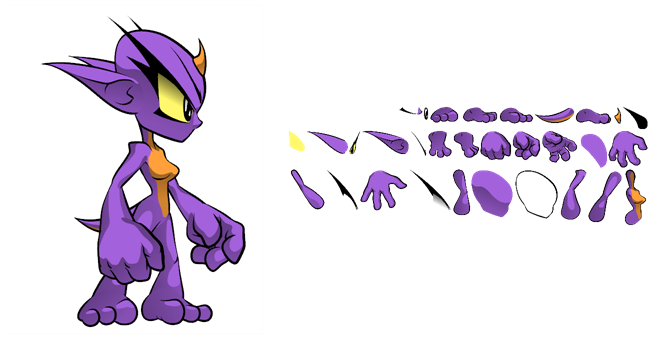
Raw game data export is appropriate when you want the file sizes to be as small as possible. Toon Boom lets you convert data directly from your Jump scene to incorporate into a game engine. You can extract the skeleton information, drawing information, and keyframe animation data, as well as deformations (bones and articulations only), cutter, transparency nodes, and timing columns.
- Advantage: This is the lightest export, and will keep file sizes small which is ideal for mobile applications.
- Disadvantage: You are somewhat limited in the tools you can use in Jump. You can use Envelope deformers, but you’ll need to bake it out to drawings so they're interpreted properly in the game engine. You can use Cutter effects (masking), but you cannot cascade them, meaning you cannot have more than one in a hierarchy chain. The Game Bone deformers can be used on your rig without having to bake it to drawings.
However, even with these limitations, you can create really great cut-out character animation in Jump and extract all the compatible data. By moving, rotating, scaling, and skewing the different drawing layers, you can create advanced looking animation.
When you extract the data, you'll have sprite sheets that contain only the drawings of the body parts used in your Jump scene file. You can also support multiple animations, such as idle, run, and jump while reusing the same skeleton and drawings.
Toon Boom has fully integrated this solution with the Unity game development rendering engine. If you are creating your game in Unity, you have a seamless pipeline without the need to re-treat the data in your game engine.
Frame-by-Frame Export
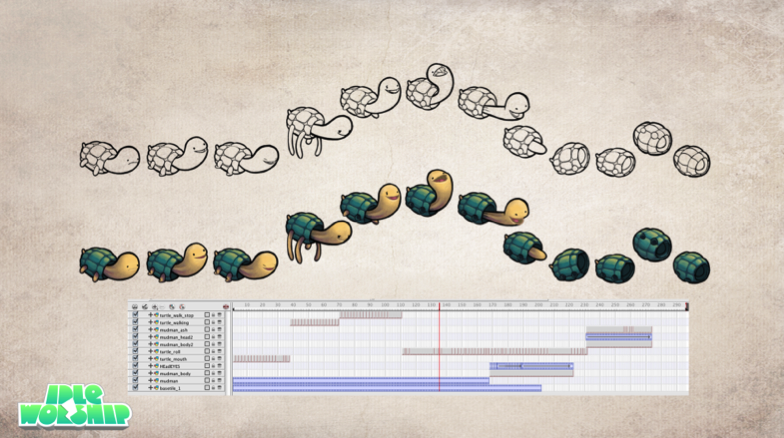
You can export from Jump using an image sequence, which can be recompiled into a sprite sheet.
Advantage: You can use any of the tools in Jump when you animate!
Disadvantage: These sprite sheets can become quite heavy and end up as large textures to process in the game. This may be fine for many games, like console games, but when you’re doing game development for mobile devices, such as iOS or Android, you need to be very light on your texture space. Also, file sizes should be kept under 50 MB to facilitate downloading without needing to be connected to Wi-Fi.