By default, Asset Editor works with vector images created within its own interface. Vector images are primarily composed of information about the different shapes composing the images, as well as their line and fill colours. This makes them easy to edit and paint, and allows us to resize them without affecting the image quality.
Vectorizing Images
Asset Editor allows you to import images as vector drawings. Vector drawings can easily be painted and edited using Asset Editor's vector drawing tools. This can be useful for importing line art scanned or created using a different software, as you can then paint it in Asset Editor.
 How to import and vectorize a bitmap image
- Do one of the following:
- From the top menu, select File > Import > Images.
- In the File toolbar, click the Import Images
button.
The Import Images dialog box opens.
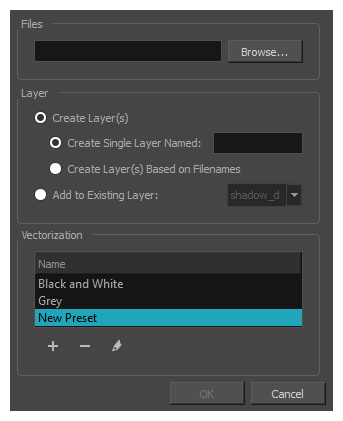
- In the Files section of the Import Images dialog box, click Browse to select one or more images from your computer.
- Select the destination for your images:
- Create Single Layer Named: Creates a new layer with the specified name and imports the images into it.
- Create Layer(s) Based on Filenames: Creates a layer based on each unique filename prefix. For example, if you import three files named a-1.tga, a-2.tga and b-1.tga, this will create two layers, one named "a" and one named "b". Layer "a" will contain the two first images and "b" will contain the third one.
- Add to Existing Layer: Imports the images into the specified layer. Note that you can only import into layers that are compatible with your import options. For example, if you're importing images as vector drawings, you can only import them into vector drawing layers.
- In the Vectorization section, select the Vectorize Image option.
-
Select one of the following options:
- Grey: Vectorizes your image as a mix of vector contour and greyscale bitmap filling. Lines keep the texture from the scan, and the white of the paper becomes transparent.
- Black and White: Vectorizes drawings with a solid black line. This creates a 100% vector-based drawing and paints it with the Vectorized Line colour swatch from your scene's palette.
Parameter Description Threshold Determines what values in the scanned image will be considered as part of the drawing, and what will be ignored and eliminated in the vectorized drawing. The lower the value, the darker the image and vice versa.
Smooth Determines how smooth the lines will be. The lower the value, the more detail will be retained. The higher the value, the more polished and easy to edit the lines will be.
- Click OK.
Your vectorized images will appear in their selected destination.