Harmony 27.1 Release Notes
Harmony 27.1, build 25743 (2026-10-14)
New Features and Improvements
Skeleton Controller (Beta)
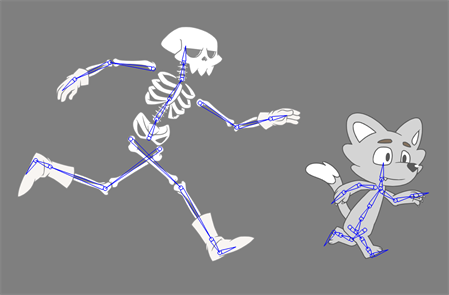
The Skeleton Controller is a new rigging system featuring a standardized bone hierarchy, allowing animation to be easily transferred from one character to another.
This skeleton can be repositioned and bound to any new or existing assets. Once bound, the Skeleton Controller will apply offset values to the asset, while leaving the underlying rig completely accessible and animatable.
This feature was designed to simplify the process of creating and applying reuse animation. It does not matter if the underlying rig is altered, new parts can be added or existing parts can be renamed. Neither will prevent reuse animation from being applied to the Skeleton Controller. Animation can even be transferred from one character to a completely different character, as long as they are using the same skeleton structure.
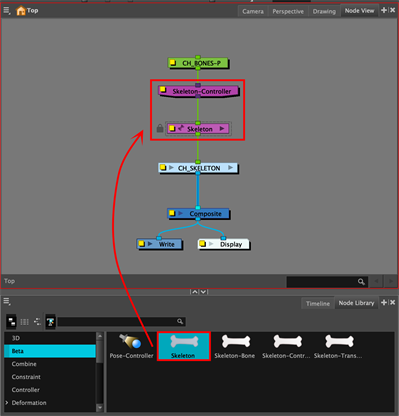
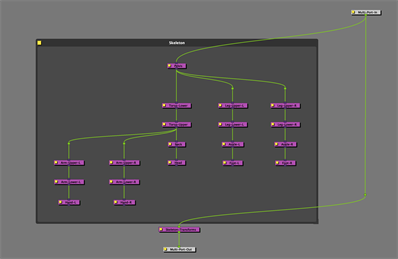
The simplest way to add a Skeleton Controller, is to drag the Skeleton node from the Beta category of the Node Library into the Node View. This will bring in both a Skeleton Controller node and a group that contains the bones for a bipedal skeleton. To prevent accidental changes, the skeleton group comes in locked by default. However if you wish to modify the skeleton group, it can be unlocked by right clicking it in the Timeline View.
To bind the skeleton to a character, open the Skeleton Controller's layer properties or the Attribute Controls View and enter "Setup Mode". Reposition the skeleton to be aligned with the character. Then the drawings or pegs from the character can be selected and bound to individual bones by pressing the "Bind Selection to Bone" button.
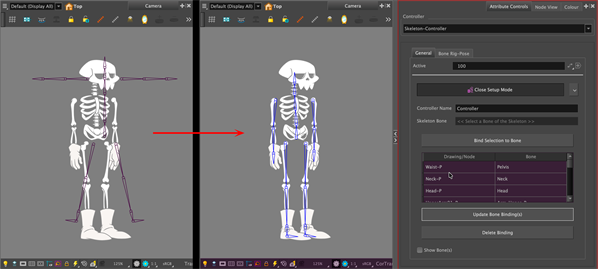
The Bones can be manipulated by using the  Transform tool. They can be rotated by dragging the "triangle" portion of the bone and positioned using the "circle" portion. The length of the bone can also be adjusted by holding the control key while rotating.
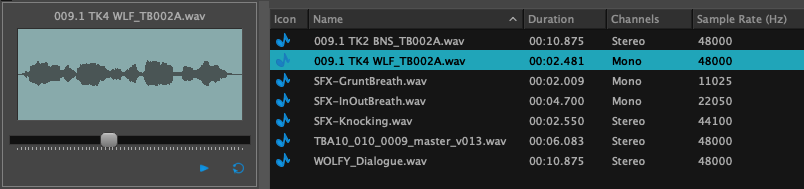
Detailed view in the Library’s audio bin
Locating audio files in your Audio bin is now easier. With the Audio Bin's updated detailed view, which introduces columns for Duration, Channels, Sample Rate, File Type, and File Name, that can be used for easy sorting.
Attribute Controllers
Improve the usability of the Attribute Controls view when using setup mode:
-
Setup mode colours can now be changed in the preferences.
-
Pose indicators change appearance based on whether pose data exists for the selected layer or node.
-
Commands to add, delete and navigate between poses are now accessible when right-clicking in the view.
-
Buttons have been added in the view for quick access to most common commands.
-
Keyframes can now be copy and pasted between normal mode, setup mode and the Library view.
-
Attribute Controller data can now be updated by using the new Paste Attribute-Controller Setup Data option in the Paste Special dialog.
General
-
The license expiration warning, that appears when the license expires in 5 days or less, can now be disabled by setting an environment variable named TOONBOOM_IGNORE_LICENSE_WARNINGS to 1.
-
The Report an Issue form now opens in the system's default web browser instead of the built-in browser, allowing you to report issues without locking Harmony’s interface.
Drawing
-
The Apply to All Drawings option in the Generate Auto-Matte dialog is now retained between sessions and is no longer tied to the Tool Properties of the same name.
3D
-
The USD library has been updated to version 25.08 to improve compatibility with the USD format.
Ember
-
The Mask Brush, Mask Eraser, and Mask Selector tools can now be used in the Drawing view, enabling Ember’s Generative Erase and Generative Fill operations to be used from this view.
Gaming
-
A Default button has been added to the Export To Sprite Sheet (XML) dialog to set the export path to the current scene folder.
-
The Export to Sprite Sheet (XML) now allows palette variations to be explicitly defined from the Palettes tab within the same export.
Scripting
-
Script packages can now be loaded from a global location in the Harmony database. Script packages located in the scripts/packages folder in the root of the Harmony database (/USA_DB/scripts/packages) will be automatically loaded when opening a scene.
-
Both the JavaScript and Python APIs have been updated to better support Attribute Controllers. HAR-11467
-
Querying an attribute value now returns the combined value of the underlying column and all offset values applied to it via an Attribute Controller.
-
When setting a value to an attribute, only the difference between the combined offset values and the provided value will be applied to the underlying column.
-
Setting an attribute value via scripting while in setup mode will now train the Attribute Controller instead of applying the value to the column.
-
Additional changes to the JavaScript API
-
The underlying value of an attribute can be queried and set directly by using:
Attribute::valueWithoutDelegatesAtAttribute::setAnimatedValueAt.
-
The
AttributeControllerclass has been added with the following functions:AttributeController::addDelegateAttributeController::bindAttributeAttributeController::nameAttributeController::nodeAttributeController::removeDelegateAttributeController::rename
-
The following functions have been added to the
nodeclass:node::attributeControllernode::hasControlledAttributesnode::connectedUpstreamControllers
-
-
Additional changes to the Python API
-
The underlying value of an attribute can be queried and set directly by using:
OMC::Attribute::value_without_delegatesOMC::Attribute::set_animated_value
-
The
OMC::AttributeControllerclass has been added with the following functions:OMC::AttributeController::add_delegateOMC::AttributeController::bind_attributeOMC::AttributeController::remove_delegateOMC::AttributeController::renameOMC::AttributeController::nameOMC::AttributeController::node
-
The following functions have been added to the
OMC::Node class:OMC::Node::attribute_controllerOMC::Node::has_controlled_attributesOMC::Node::connected_upstream_controller
-
Scenes without Attribute Controllers will remain unaffected by these changes, and any existing scripts used in those scenes will continue to function normally.
-
SDK
-
Bitmap drawing operations made through
GR_BitmapAccessnow support undo and redo operations.
License Wizard
-
V2 licenses in the Local Licence Manager, which can be accessed using the Manage License Keys command, now display an Active or Inactive status in the "Expiration Date" column.
Fixes
General
-
Drawings become inaccessible after a failed attempt to rename an element. HAR-11608
-
Renaming an element fails when changing only the letter case. HAR-9143
-
On macOS, the main application becomes accessible when a modal dialog is minimized, which could potentially cause a crash. HAR-11407
-
Utransform is no longer able to create a textured TVG from a raster image. HAR-12069
-
The application freezes on startup while attempting to load "Latest News" on networks where outbound connections are blocked by a firewall. HAR-11769
-
The Harmony 27 Windows installer does not create Start Menu shortcuts when run as a silent install. HAR-12084
Drawing
-
The Centerline Editor stops working after undoing. HAR-11916
-
When the Light Table is enabled in the Drawing view, drawings from disabled layers are loaded into memory and never unloaded. HAR-11776
Attribute Controllers
-
When dragging an interpolator's controller, the position snaps to a slightly different location when the mouse is released. HAR-12102
-
The red controller turns white and stops updating if the frame is changed while the control is being dragged. HAR-11933
-
Performance is noticeably slower while in Setup Mode. HAR-11913
-
The Attribute Controls view has an unnecessary menu button that does not function. HAR-11909
-
The Attribute Controls view tab is missing translations for all non-English languages. HAR-11906
-
Closing a scene does not close the "Reassign Target Attributes" dialog and may cause a crash. HAR-11890
-
Attribute Controller menu and toolbar actions are mistakenly disabled when a group containing controller nodes is selected. HAR-11836
-
Locking a layer disables Controller menu options in the Timeline but not in the Node View. HAR-11828
-
Using the Delete shortcut to remove a pose point in setup mode also performs a second delete operation in the last view that had focus. HAR-11825
-
When only one pose position exists on a Timeline Slider Interpolator, training it places the keyframe at frame 0 instead of frame 1. HAR-11823
-
The Attribute Controller rename dialog does not have a cancel option, forcing the rename to always be applied. HAR-11796
-
Switching the axis orientation of a Slider Interpolator collapses all existing pose positions to the origin instead of remapping them to the new axis. HAR-11759
Ember
-
Expanding an image produces a misaligned result with an incorrect scale when the source image lacks a well-defined edge and the output hits the 5000-pixel limit. HAR-11623
Import / Export
-
The MultiLayerWrite node exports PSD layers with a pre-multiplied alpha instead of a straight alpha. HAR-11901
-
Apple QuickProRes videos exported with a Linear color space do not include properly tagged colour metadata on macOS HAR-11837
Library
-
Pasting an audio file between Library sub-folders does not show the pasted file until the folder is manually refreshed. SB-6629
-
The Library view does not refresh after templates are pasted into it. HAR-11713
-
Using "Generate Thumbnails" on a Library folder collapses it and removes the expand icon. SB-6628
-
Undoing and then redoing a template import causes some drawings to go missing. HAR-11782
Nodes
-
The Mesh Warp node crashes Harmony if the rows or columns attributes in its layer properties are changed by mouse dragging. HAR-11922
-
Node View thumbnails do not refresh when an effects node is inserted into the hierarchy. HAR-11895
-
The Animate-Pencil-Texture node does not hold correctly after the last keyframe when "Hold between stop-motion keyframes" is enabled. HAR-11926
OpenGL
-
The Directional Blur rotates with the drawing instead of staying oriented relative to the camera. HAR-11807
-
Enabling "Current Drawing on Top" makes the current drawing appear darker. HAR-11894
Palettes
-
The Palette Browser only lists palettes from the current job or environment. HAR-11944
-
Palettes in Environments and Jobs are no longer visible in the Palette Operations dialog. HAR-11942
Database and Control Center
-
Importing a scene as a new version deletes elements from previous versions if they don't exist in the new version. HAR-12085
Preferences
-
Importing a preferences file fails with a facility-wide lock error when the Storyboard Pro’s language is set to Japanese. SB-6708
License Wizard
-
Borrowing a license from a floating license server fails. HAR-11722
-
License Wizard will not launch on systems that do not have an accelerated video card. HAR-11635
Scripting
-
All toolbar buttons created with the Extended Scripting API display the same keyboard shortcut in their tooltip regardless of their assigned shortcuts. HAR-11958
Gaming
-
PNG images imported as Toon Boom Bitmaps are not included in spritesheet exports when the Line Art Type is set to Vector. HAR-11904
-
Exporting a TBG file to a path containing white spaces produces an empty TBG on Windows. HAR-11903
-
Selecting Use "Scene Markers" in the "Export to JSON Sprite Sheets" dialog fails with an error if the scene does not contain scene markers. HAR-11811
-
Palette changes made after the initial spritesheet export are not applied to subsequent exports. HAR-11789
Utility
-
The Pix2vec utility fails with "No input file specified" when a database server is running and the input file is not within the database directory structure. HAR-11528