Activate/Return Licenses in your Accounts
When you select the Activate/Return Licenses in your Account from the drop down menu of the License Wizard 2.0, the Manage Licenses in your Account window will launch. The Manage Licenses in your Account window is a centralized location where you can view all your Toon Boom product licenses at a glance. From this page you can view the product name, product key and expiry date of your license subscriptions.
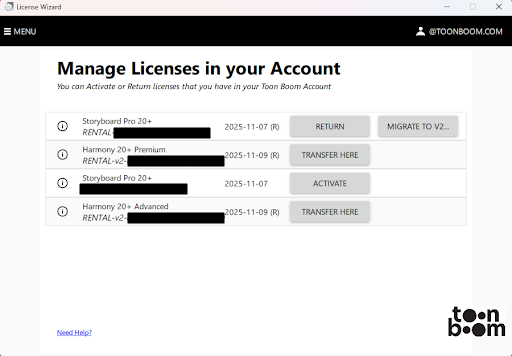
In addition to reviewing your licenses and their parameters, you can perform different operations.
You can perform the following operations.
Next to each license is an  information icon. When you click the information icon, a dialog will appear displaying all the parameters of your license.
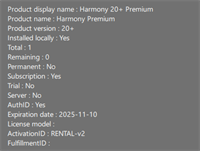
The following parameters are displayed:
-
Product Display Name: The name of the Toon Boom product and product version as it appears when launching the software.
-
Product Name: The name of the Toon Boom product.
-
Product Version: The current iteration of the software license.
-
Installed Locally: Indicate if the license is installed on a local workstation or if it is contained in the server.
-
Total: The total number of license seats available with your license.
-
Remaining: The number of license seats available to activate on other workstations.
-
Permanent: Will indicate if the license type is a perpetual license.
-
Rental: Will indicate if the license type is a subscription license.
-
Trial: Will indicate that the license is a trial version.
-
Server: Will indicate that the license is a server license.
-
Expiration Date: The date when the license will expire and no longer be operational.
-
License Model: The name of the license model that defines its functionality and limits.
-
Activation ID: The Product Code used to activate your license.
-
Fulfilment ID: A unique product code that acknowledges the activation of your license and fulfils the contract between the user and server for that activation.
Next to each item will be either the word Yes or No. Yes indicates the active status of the license parameter. No indicates the inactive status of the license parameter.