Storyboard Pro 25.1 Release Notes
Storyboard Pro 25.1, build 24630 (2025-12-02)
New Features
New Licensing Technology
A new licensing system and a new License Wizard is introduced in Storyboard Pro 25.1. The new License Wizard provides a simplified user interface and activation process, and supports new licensing technology that will allow managing licenses remotely.
A new version of licenses is required in order to manage them remotely. These version 2 licences will be rolled out progressively over the next few months to studios and individual users.
The License Wizard user interface has been updated to present a more modern and streamline experience.
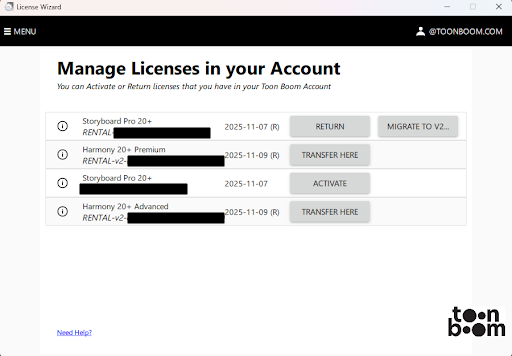
The Manage Licenses in your Account window is a centralized location where you can view all your Toon Boom product licenses at a glance. From this page you can view the product name, product key and expiry date of your license subscriptions.
Adjust Dialogue Intonation with AI
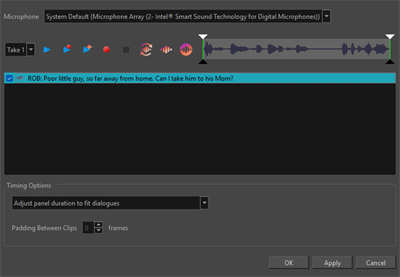
The Adjust Dialogue Intonation with AI enables you to enhance audio dialogues in your storyboard using AI. You can select a panel with dialogue and either record a new soundwave, enhance the existing audio using AI or convert unrecorded dialog into an audio clip.
Improvements
Ember Functionalities
Toon Boom Ember functionalities are now enabled by default in this release of Storyboard Pro.
A free Ember license, which is included with subscription licenses of Storyboard Pro, is required for these tools to work.
If you are not using a subscription license of Storyboard Pro, you can request a free Ember license add-on by sending an email to licensor@toonboom.com. Please include the email address linked to your Toon Boom account, as well as which product, Harmony or Storyboard Pro, you are requesting the add-on license for.
For more information, see Activating Ember.
Ember functionalities can be disabled by unchecking the “Enable Ember Functionalities” preference, located in the Advanced category of the Preferences window.
General
-
An option to create a Compacted file has been added to the "Extract Storyboard" dialog.
Conformation
-
Added the options to "Convert" or "Update Project" when importing a XML/AAF with a different frame rate than the Storyboard Pro project.
Fixes
General
-
Enabling the "Use Optimized Drawings" preference causes some panels to be blank during playback and scrubbing. SB-6389
-
The Timeline is corrupted after using "Merge and Replace" when the merged section contains transitions. SB-6370
-
If a layer is contained in a group with transformations, "Pin to Camera" does not take the group's transformation into account. SB-5635
-
Some popup menus can appear in unexpected positions when Storyboard Pro is not on the default display in macOS. SB-6353
-
When "Layer Keyframe Sync Mode" is set to none, trimming a panel's length will add unnecessary keys to attributes without existing keyframes. SB-5930
-
The Scale Factor is not applied to 3d models when they are exported to FBX files. SB-5281
-
The drawing selection is flipped from the wrong location when using the Flip Horizontal and Flip Vertical shortcuts. SB-6305
-
The default blur quality preference is set to "Best Quality" when it should be "Best Performance". SB-6326
-
The Radial Zoom Blur effect crops the image at the default camera position within a 12-field frame. SB-6391
-
When a template is used as a video track clip the last frame is missing. SB-6342
Ember (AI)
-
Using the Clear mask operation on some Toon Boom bitmap drawings will cause the bounds for subsequent AI mask operations to be cropped. HAR-11211
-
Some Final Draft Scripts can cause Storyboard Pro to crash when "Create Scenes" from the "Analyze Script with AI" dialog is used. SB-6457
Conformation
-
Exporting to a XML with smooth camera moves across multiple panels results in incorrect camera keyframe values in the exported file. SB-6363
Effects Stack
-
Storyboard Pro crashes when playing audio clips in the effect stack that are longer than their panels. SB-6402
-
The copy and paste options are always greyed out when right-clicking on the transformation group. SB-6223
-
Keyframes can be pasted past the end of panels and sound clips. SB-6351
-
Opacity keyframes disappear after they are dragged and dropped in the timeline. SB-6358
-
The resulting selection, after copying and pasting keyframes, changes depending on where they are pasted. SB-6227
Import / Export
-
Importing an AAF created in Pro Tools changes the project's frame rate. SB-6352
-
In certain projects, exporting to PDF with the "Camera Mask" option enabled can cause Storyboard Pro to freeze or crash. SB-6390, SB-6394
-
Snapshots are ignored when exporting a PDF unless the "Frame Snapshot" option is selected in the PDF profile options. SB-6398
-
FBX export settings are not saved between instances of Storyboard Pro. SB-5934
-
"Export Audio" does not allow for non-contiguous selection when "Break Sounds per Scene" is enabled. SB-5494
-
When vector files are imported, the entire file path is used for the shot name instead of just the file name by itself. SB-6322
-
The "Import Images" dialog is mistakenly launched when importing video files if the “Display Vectorize Options Dialog” preference is enabled. SB-5964
Scripting
-
Storyboard Pro crashes when using ExportManager::exportToHarmony with ExportManager::setRenderedAnimatic enabled in batch mode. SB-6397
-
Captions in XML files contain rich text formatting when running the exportToFCPXML script with the -batch option. SB-5899
-
Using Action::perform with "owner" as the responder parameter causes Storyboard Pro to crash. HAR-11295
-
Exporting with the ExportManager class fails when ExportManager::setUseSelectedPanels is enabled. SB-6187
Thumbnail Page
-
Text layers are not cropped and they are included in every panel after being converted to panels. SB-6213