Producer 26.2
26.2.0 (build 3513, August 07, 2026)
In Summary
Producer 26.2 introduces several key enhancements and bug fixes. The Review Tool now allows manual reordering of submissions in the Review List. The Scene Focus View features new scene thumbnails for improved scene navigation. Producer Link includes critical bug fixes for video uploads and snapshot downloads.
New Features
Review Tool
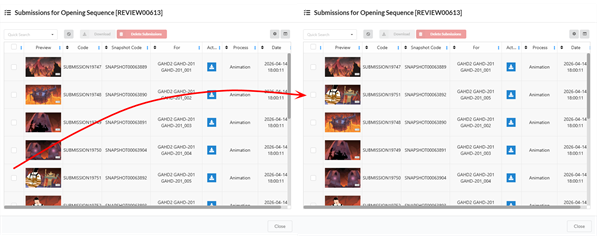
Submissions in the Review List can be manually reordered by using the drag and drop feature. After reorganizing your Review List, the Review Tool will playback your submissions in their new order.
Workflow Editor
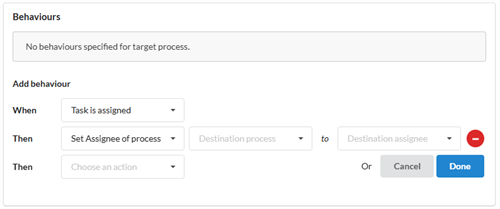
The behaviour Set Assignee Process will automatically reassign tasks to specified users based on the Destination Process and Assignee that are input.
-
Destination Process: Which Task in the Workflow will be affected.
-
Destination Assignee: The user who will be assigned to the following task in the Workflow.
Scene Focus View
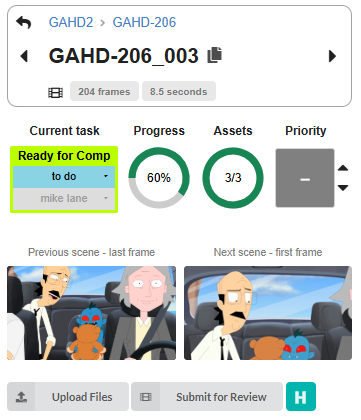
The Summary section of the Scene Focus View contains thumbnails that display the previous scene's last frame and the next scene's first frame.
Note Mentions
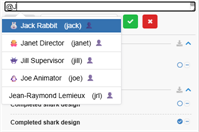
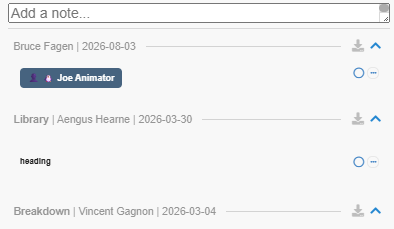
By typing “@”, you can tag collaborators in Notes. When you type “@”, an autocomplete dropdown will appear listing users and groups involved on the current project.

When a user is mentioned in a Note, the user will be notified in the Notification Feed. The user will be able to view the Note, Scene or Asset name and the collaborator that mentioned them.
Related Items Preview
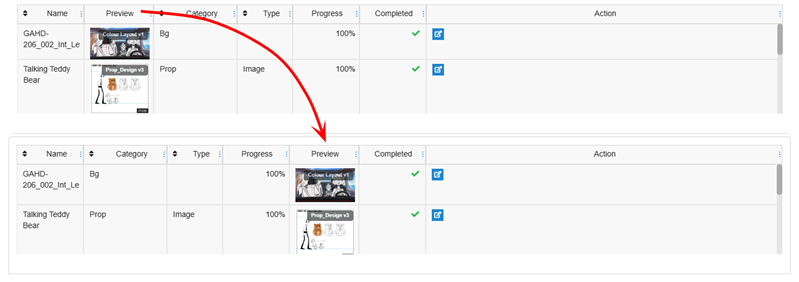
In the Focus View, the Related Items section displays thumbnail previews for all linked items. These thumbnails make identification of relevant assets and scenes more efficient for the user. (MA-4990)
The columns in the Related Items section can be reordered using drag and drop.
General
Chrome Extension Support
The Bitwarden Chrome extension can now be used within Producer. The Content Security Policy has been adapted to allow it.
Bug Fixes
Scene Focus View
-
Asset progress in the Scene Focus View displays the correct completion value when the page is accessed directly. (MA-5111)
-
Workflow progress in the Focus View displays the correct value rather than 0%. (MA-5149)
Producer Link
-
Uploading videos no longer display an audio or video duration mismatch error when no discrepancy exists in the file. (MA-5159)
-
The download button is available when expanding a snapshot preview to fullscreen. (MA-5139)
-
With External Asset mode set to "Exchange," Producer Link no longer fails to open newly created standalone Harmony scenes. Producer Link successfully searches local workspace where the files reside rather than in the remote assets storage. (MA-5260)
Production
-
The Filesystem dropdown no longer appears when editing external references for Harmony Database environments. (MA-5171)
-
Retired scenes no longer cause the Production page to repeatedly re-fetch progress and overload the server. (MA-5233)
-
After reloading, the "show retired" filter on the scene list will remain set as it was rather than resetting. (MA-5257)
Assets
-
The Focus View will no longer re-fetch the asset list, when navigating back to the Focus View page, the content will show what was already there. (MA-5259)
Workflow Editor
-
Creating a workflow using "Copy From" with an empty workflow as the source no longer results in a blank page. (MA-4795)
Review Tool
-
Downloading a fully stitched movie from the Review Home page no longer fails when the review includes a large number of scenes. (MA-5182)
-
Drawing note tooltips and thumbnails in the Review Tool now display the correct frame number. (MA-3746)
-
Downloading a review's submissions as a .zip no longer drops files. (MA-4039)
-
The Review Tool will play back a smooth video when stitching with a large number of scenes. (MA-5258)
Open Tasks
-
Quick Search no longer returns an empty list when searching for an assigned task. (MA-5012)
General
-
Workflow notification behaviours are now project-specific and no longer affect other projects with identically named workflows and processes. (MA-5151)
-
Notification behaviours are included when copying a workflow process or an entire workflow. (MA-4937)
-
The GET /tag endpoint no longer returns phantom null tag entries. (MA-5160)
-
Uploading a video snapshot with an unusual resolution no longer fails. (MA-5218)
-
Editing the external reference pattern under General Settings validates the pattern. Assets can no longer be created with an invalid file. (MA-5170)
-
Reloading the Focus View page no longer freezes Assets or Open Tasks. (MA-5207)
-
Fixed note "updated" timestamp showing hours before creation, caused by double-applying a UTC offset to already-zoned ISO timestamps. (MA-5178)
-
Notification bell badge shows unread counts (e.g. for note @mentions). (MA-5240)
-
In Scene Focus View, changing the Priority took a long time. (MA-5174)